




















Using Events of the Report Render Process
Наши примеры проектов и шаблоны отчётов помогут Вам разобраться в основах работы с нашими продуктами.Handle the relevant report event in Java and use its arguments to adjust the application behavior.
First, create the
Handling the event. Subscribe at the relevant lifecycle point, inspect the event arguments, and apply the application-specific behavior in the handler.
For example, we use the 'SimpleList' report. Load this report template and add a Demo database to the report object:
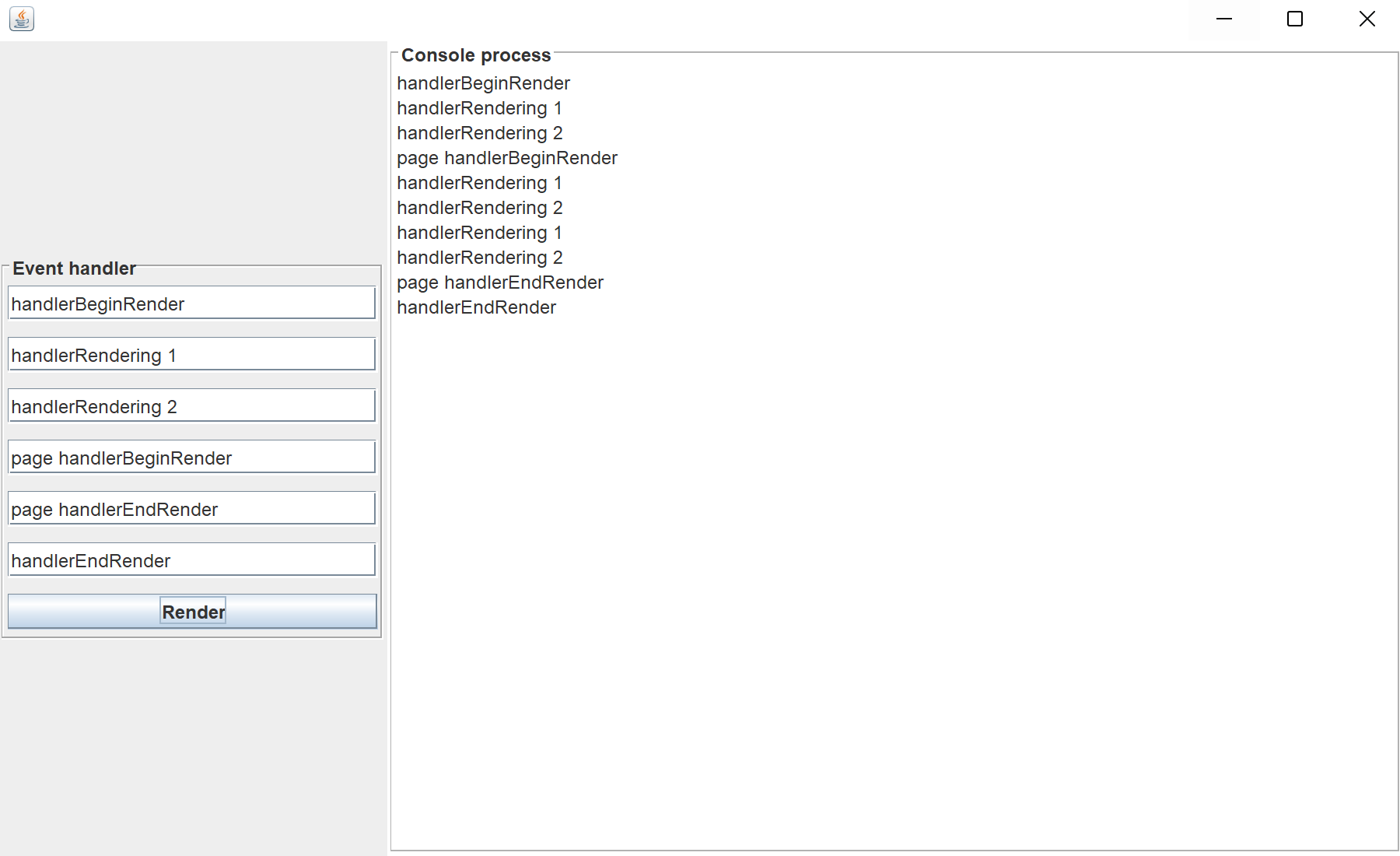
To demonstrate the call order of events at report rendering, we will add several handlers. Each handler will add the text in the text area on the application form:
На скриншоте ниже Вы можете увидеть результат выполнения данного кода:
First, create the
JFrame and set the necessary options:Handling the event. Subscribe at the relevant lifecycle point, inspect the event arguments, and apply the application-specific behavior in the handler.
public static void main(final String[] args) {
	SwingUtilities.invokeLater(new Runnable() {
		public void run() {
			try {
				JFrame frame = new JFrame();
				frame.add(new EventsOfTheReportRenderProcess(frame));
				frame.setSize(FRAME_SIZE);
				frame.setLocationRelativeTo(null);
				frame.setDefaultCloseOperation(JFrame.EXIT_ON_CLOSE);
				frame.setVisible(true);
			} catch (Throwable e) {
				StiExceptionProvider.show(e, null);
			}
		}
	});
}
For example, we use the 'SimpleList' report. Load this report template and add a Demo database to the report object:
final StiReport report = StiSerializeManager.deserializeReport(new File("Reports", "SimpleList.mrt"));
StiXmlDatabase xmlDatabase = new StiXmlDatabase("Demo", "Data/" + "Demo.xsd", "Data/" + "Demo.xml");
report.getDictionary().getDatabases().add(xmlDatabase);
To demonstrate the call order of events at report rendering, we will add several handlers. Each handler will add the text in the text area on the application form:
report.handlerBeginRender.add(new StiEventHandlerListener() {
	public void invoke(StiEventObject myEvent) {
		appendText(beginRender);
	}
});

report.handlerRendering.add(new StiEventHandlerListener() {
	public void invoke(StiEventObject myEvent) {
		appendText(subProcessField1);
	}
});

report.handlerRendering.add(new StiEventHandlerListener() {
	public void invoke(StiEventObject myEvent) {
		appendText(subProcessField2);
	}
});

report.getPages().get(0).handlerBeginRender.add(new StiEventHandlerListener() {
	public void invoke(StiEventObject myEvent) {
		appendText(subProcessField3);
	}
});

report.getPages().get(0).handlerEndRender.add(new StiEventHandlerListener() {
	public void invoke(StiEventObject myEvent) {
		appendText(subProcessField4);
	}
});

report.handlerEndRender.add(new StiEventHandlerListener() {
	public void invoke(StiEventObject myEvent) {
		appendText(finishField);
	}
});
На скриншоте ниже Вы можете увидеть результат выполнения данного кода: