




















Changing the Viewer Theme
Наши примеры проектов и шаблоны отчётов помогут Вам разобраться в основах работы с нашими продуктами.The web viewer ships with a set of visual themes and appearance options, chosen where the viewer component is declared in the Razor view.
Set the theme and background on the viewer. In
How it works. The theme and appearance are viewer options, so a single declaration in the view controls the look without touching the report or controller.
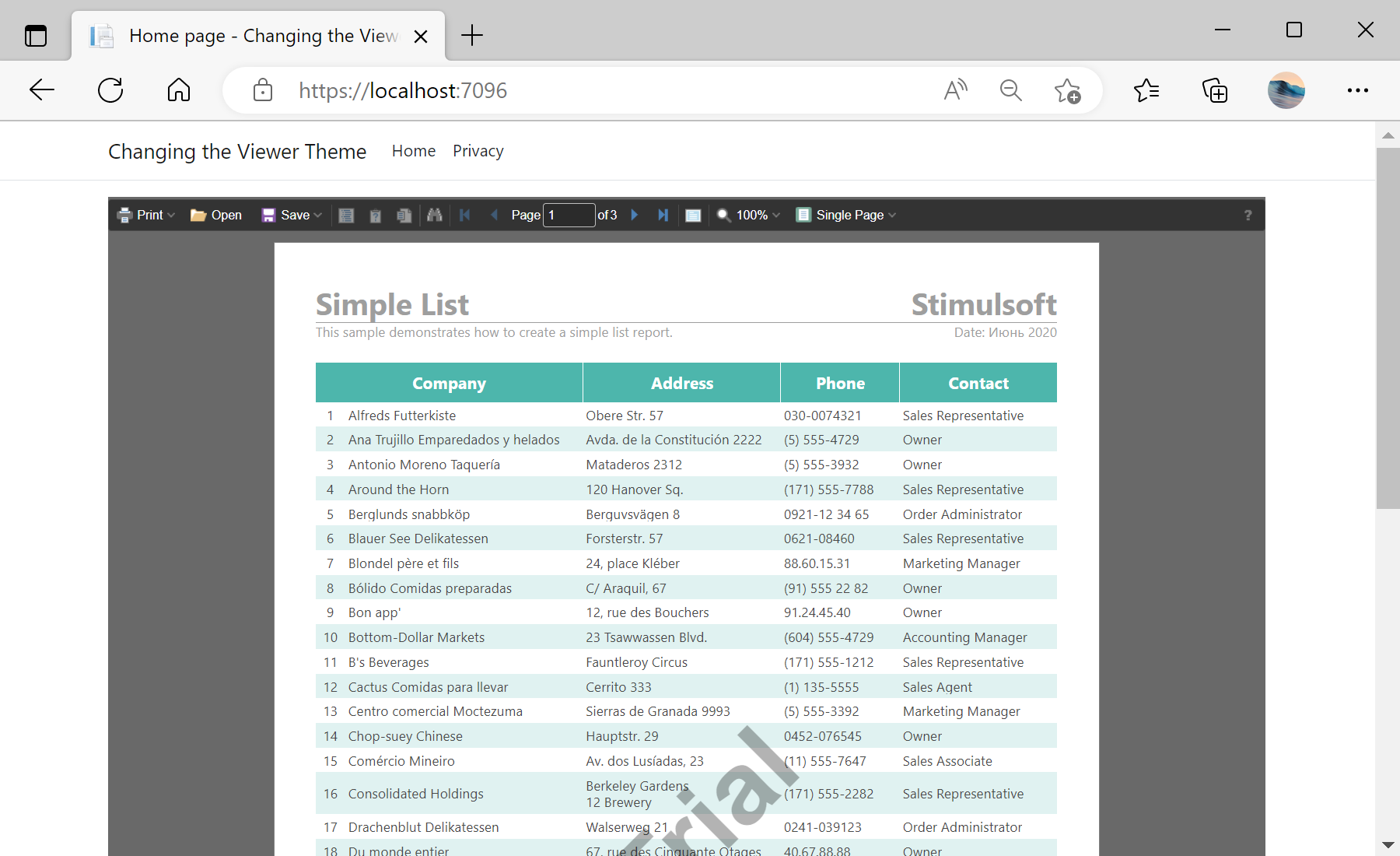
На скриншоте ниже Вы можете увидеть результат выполнения данного кода:
Set the theme and background on the viewer. In
Index.cshtml:@Html.StiNetCoreViewer(new StiNetCoreViewerOptions()
{
Actions = { GetReport = "GetReport", ViewerEvent = "ViewerEvent" },
Appearance = { BackgroundColor = System.Drawing.Color.DimGray },
Theme = StiViewerTheme.Office2022BlackPurple
})Theme— one of theStiViewerThemepresets (e.g.Office2022BlackPurple) that restyles the whole viewer UI.Appearance.BackgroundColor— the color behind the report pages.
How it works. The theme and appearance are viewer options, so a single declaration in the view controls the look without touching the report or controller.
На скриншоте ниже Вы можете увидеть результат выполнения данного кода: